
The paperwork side of landlording, handled.
Rent tracking, tax-ready expense logging, maintenance, renewals, checklists, notices and screening — eight files that do the remembering for you, so you can run the properties.
- 4 Excel workbooks (open in Excel or Google Sheets), 3 editable Word templates, 1 printable PDF
- Schedule E builds itself as you log expenses
- One-time purchase. No subscriptions, no accounts, no logins.
Secure checkout by Gumroad · instant download · 30-day refund, no questions
Sticky notes. A shoebox of receipts. “I think she paid.”
That's how most small portfolios run — until a deposit dispute, a missed renewal deadline, or an April panic makes it expensive. The fix isn't $40/month software you'll fight with. It's a set of files that do the remembering for you.
Eight files. Every job a small landlord actually has.
Exactly what lands in your download: 4 spreadsheet workbooks (.xlsx — open natively in Excel, import cleanly to Google Sheets), 3 editable documents (.docx — Word, Google Docs or Pages) and 1 printable one-page PDF. Plus a START HERE guide and the license. No macros, no add-ons, no account required.
Rent Tracker
Log a payment; the dashboard, color-coded rent roll, and late flags update themselves. Room for 20 units, 40 leases and 600 payments.
Excel · .xlsxExpense Log + Tax Helper
Every expense lands on the right Schedule E line, per property — up to 8 properties. Mileage log included.
Excel · .xlsxMaintenance Request Log
From “tenant texted me” to fixed and filed — with a nudge that gets costs into your taxes.
Excel · .xlsxKey Dates & Renewal Tracker
“Send notice by” dates calculated for you. Amber at 30 days. Red means now.
Excel · .xlsxMove-In / Move-Out Checklist
Room-by-room, side-by-side, signature-ready — a dated condition record to support your deposit decisions.
Word · .docxNotice & Letter Templates
Welcome, late-rent reminder, renewal offer, rent increase, notice of entry — fill in the blanks, check your local rules, send.
Word · .docxTenant Screening Checklist
A 10-step process with Fair Housing and FCRA checkpoints built in — including the adverse-action steps most landlords miss.
Word · .docxBonus: Tax Cheat Sheet
The 1-page fridge version of your Schedule E deductions.
Printable PDFTax season becomes one printable page.
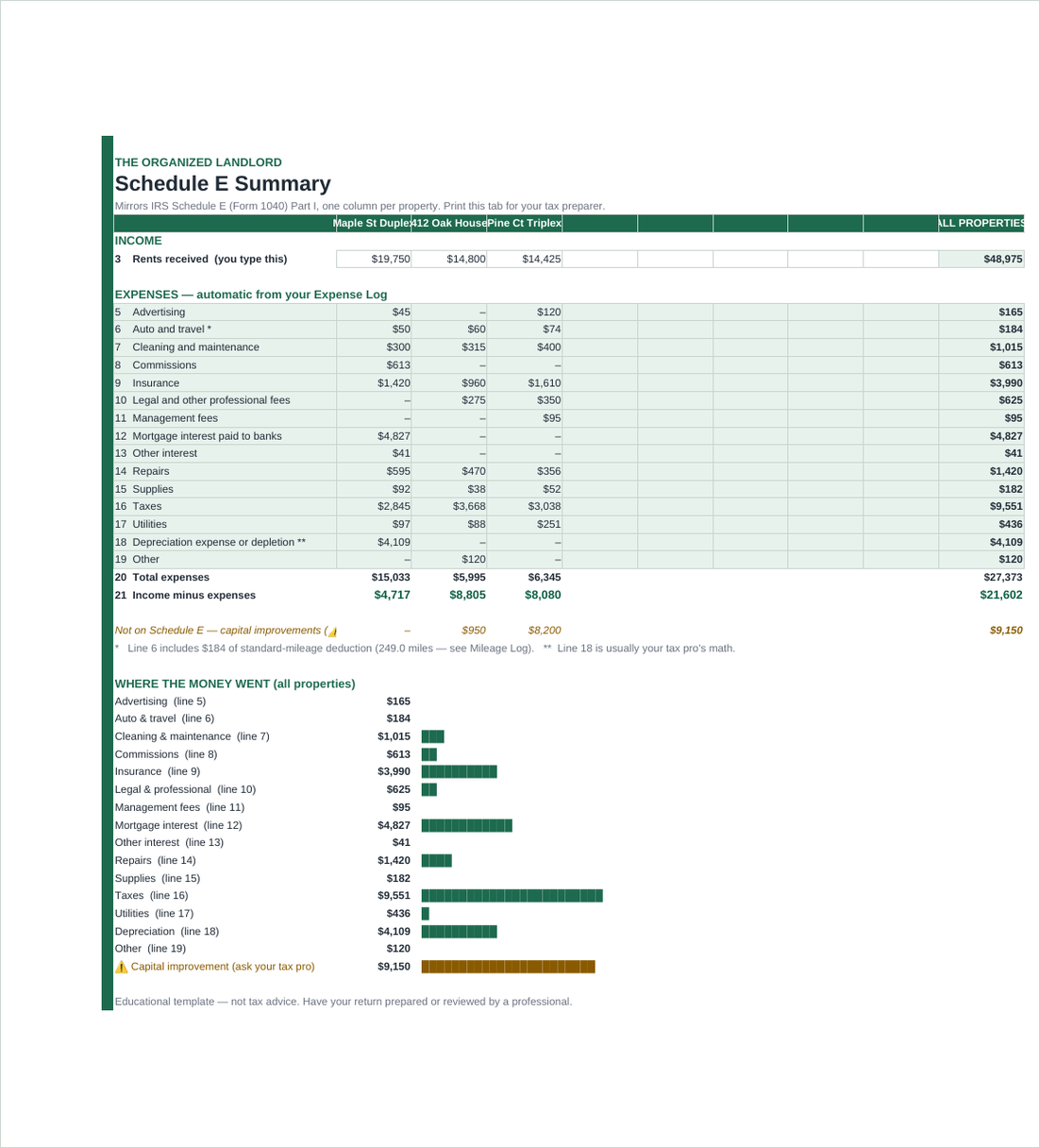
Log expenses as they happen — the toolkit files each one under its exact IRS Schedule E line (lines 5–19), per property. Capital improvements get caught and kept separate (the #1 small-landlord tax mistake). The mileage log ships preloaded with the 2026 IRS rates, including the July 1 change — and the rates sit in editable cells, so you can update them yourself in any future year.
- Year-end summary mirrors the Schedule E form itself
- ⚠ Improvement-catcher keeps big projects off your deduction lines
- Your accountant gets one clean page, not a shoebox
Who's paid. Who's late. Who's drifting.
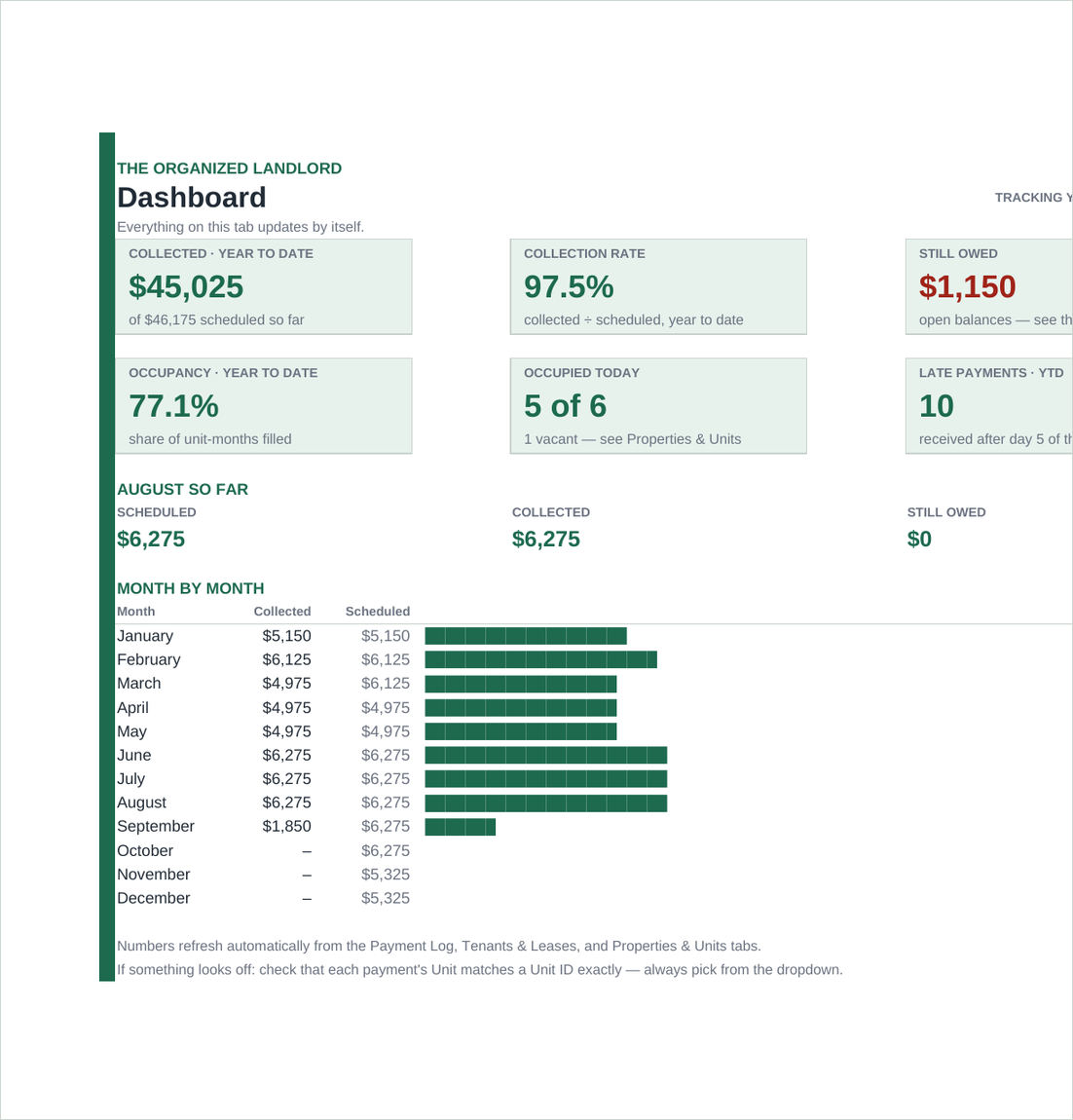
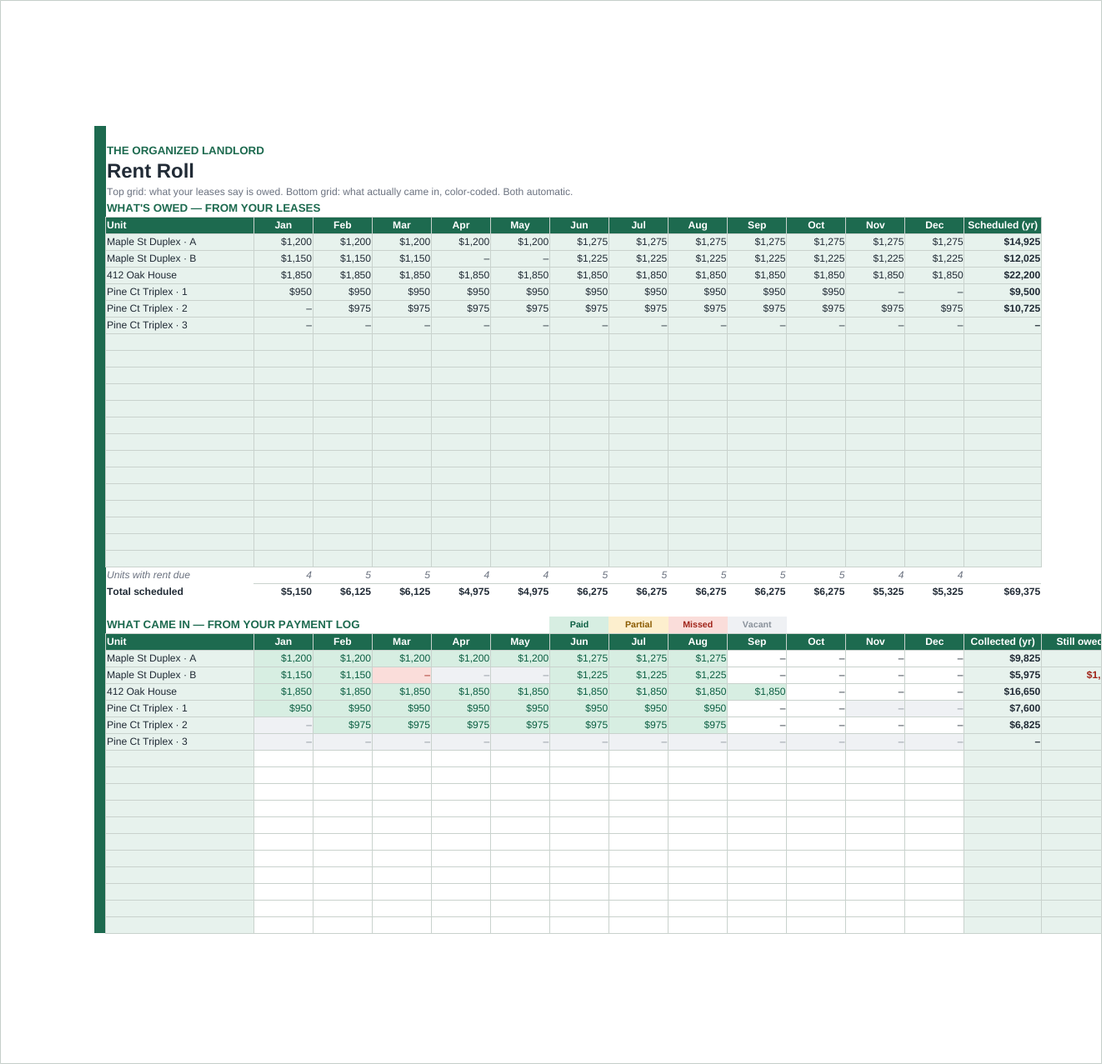
Payments log like a bank statement — one row each — and the rent roll draws itself: green paid, amber partial, red missed, gray vacant. Partial payments, catch-ups, and mid-year rent increases all just work.
- Collection rate, occupancy, and outstanding balances at a glance
- Late flags computed from your grace period
- Formulas locked so a stray keystroke can't break the math — unprotect anytime, no password
Checklists and letters that hold up.
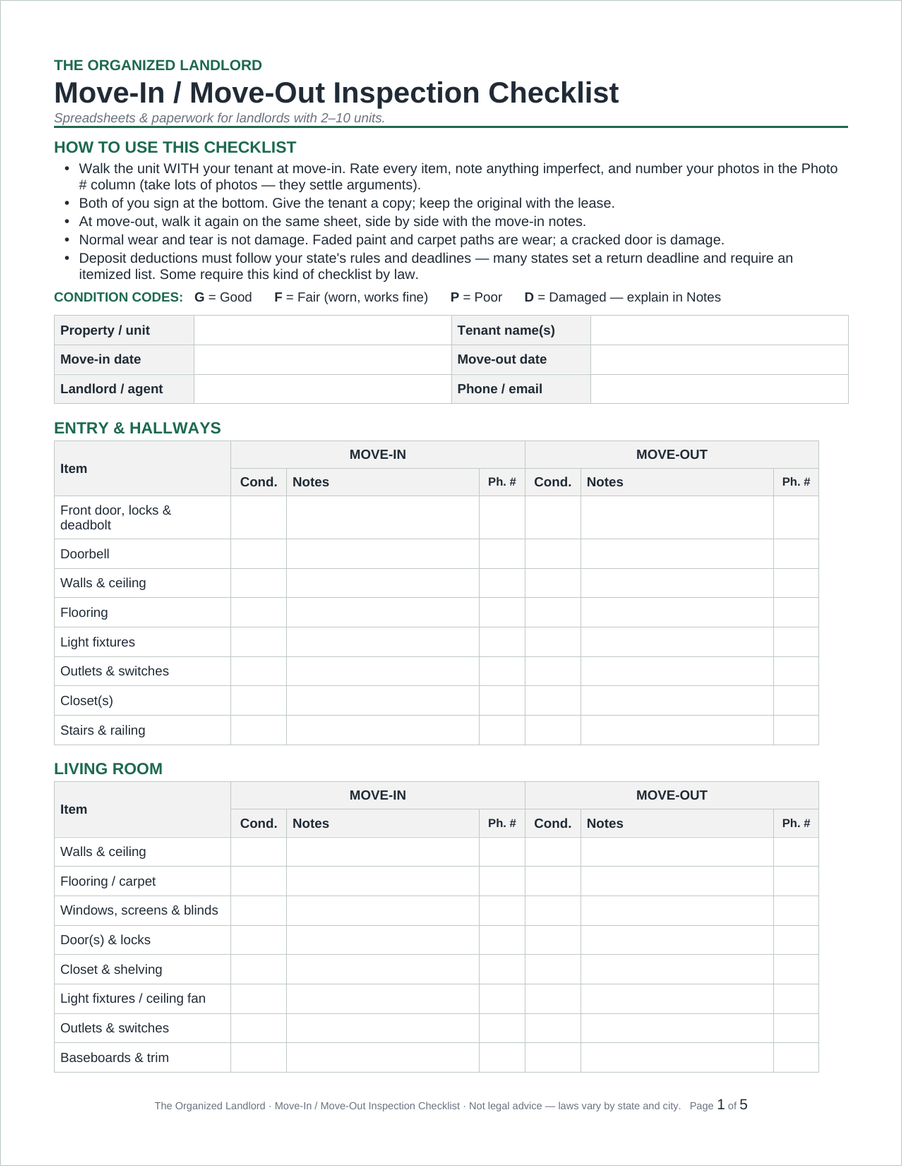
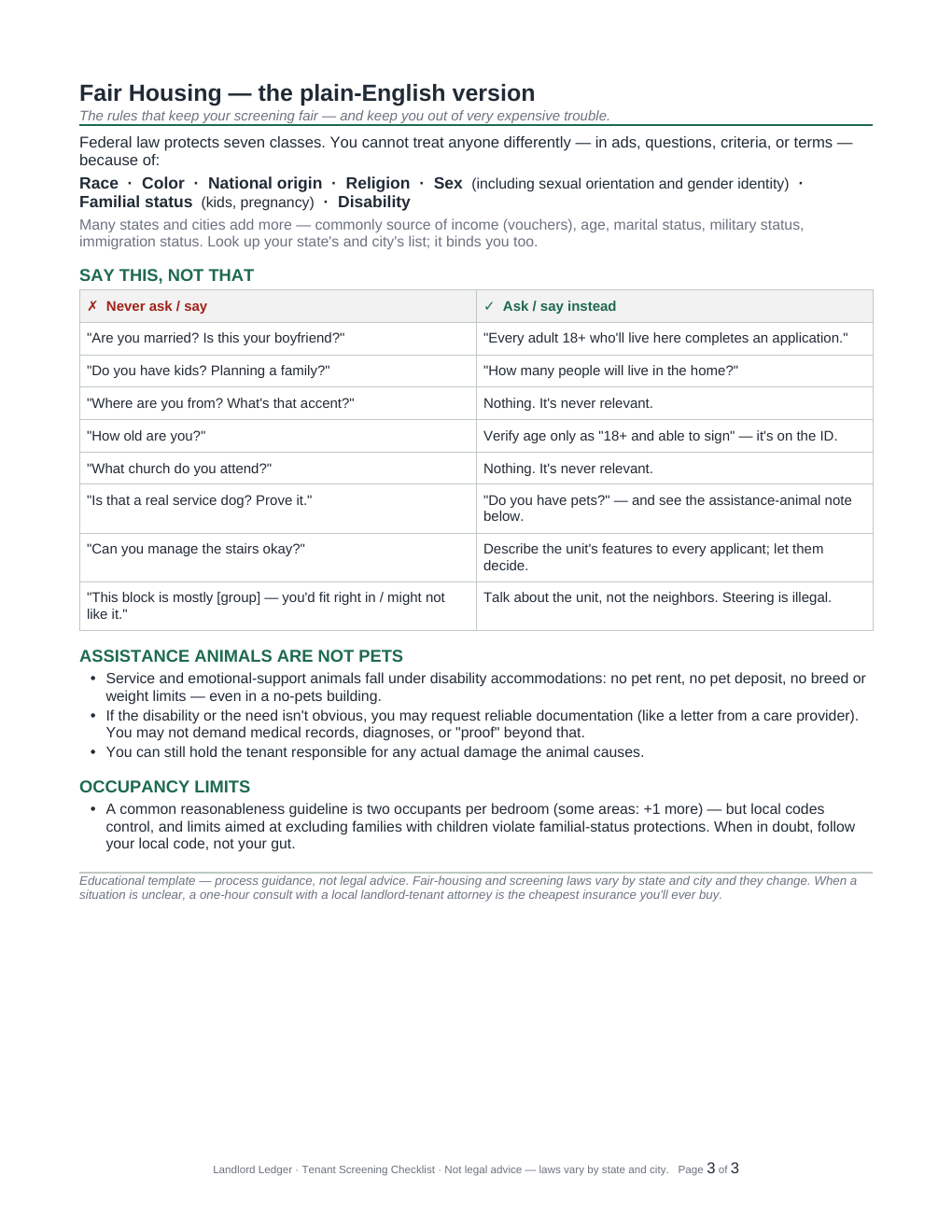
A move-in/move-out inspection built for deposit season, five ready-to-send letters with fill-in-the-blank fields, and a screening process with a plain-English Fair Housing and FCRA walkthrough — every legal-adjacent page tells you exactly where to check your state's rules before you send.
- Editable .docx — Word, Google Docs or Pages; prints clean in black and white
- Caution boxes flag what varies by state — before you send
- Educational templates, clearly marked — not legal advice
The part where mistakes get expensive.
Screening is where small landlords are most exposed — and where the rules are least intuitive. The checklist walks the same ten steps every time, with Fair Housing and FCRA checkpoints written in plain English and a reminder that protected classes and screening criteria vary by state and city.
Every formula in every workbook was verified against independent calculations — thousands of checks across a year of deliberately messy test data: partial payments, mid-year rent increases, tenant turnover, missed months, refunds, even the IRS's 2026 mid-year mileage change. Then each file was uploaded to Google Sheets and tested live. That's the bar a $49 toolkit should meet. How these files were tested →
Get the complete toolkit
4 Excel/Google Sheets workbooks + 3 editable Word templates + 1 printable PDF, plus a START HERE guide. Instant download — the files are yours to keep, and you can re-download any revision we publish.
$49 one-time purchase
Secure checkout by Gumroad · 30-day money-back guarantee · support@landlordledgerhq.com
Questions landlords ask
Exactly what do I get?
A single download containing eight files, plus a START HERE guide and the license:
- 4 spreadsheet workbooks (.xlsx) — Rent Tracker, Expense Log + Tax Helper, Maintenance Request Log, Key Dates & Renewal Tracker
- 3 editable documents (.docx) — Move-In/Move-Out Checklist, Notice & Letter Templates, Tenant Screening Checklist
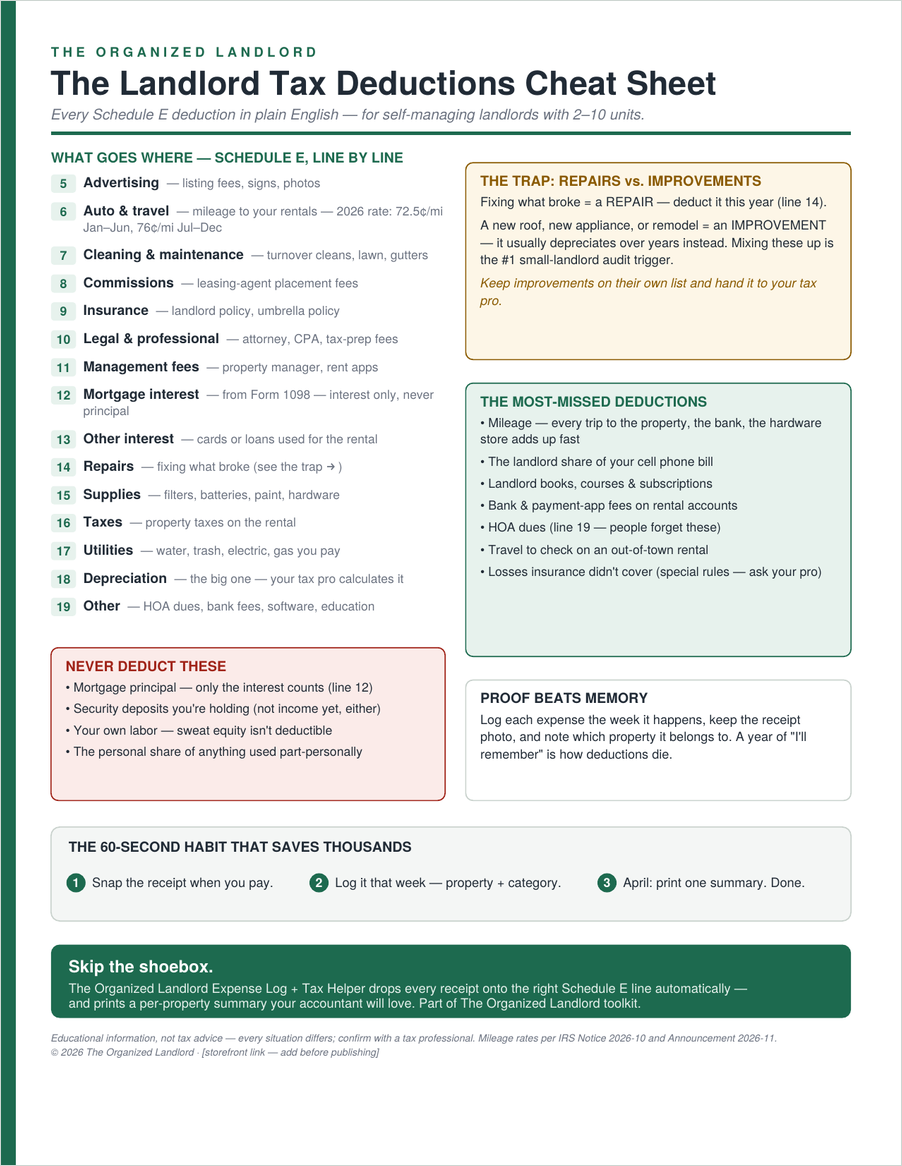
- 1 printable PDF — the Tax Deductions Cheat Sheet
No macros, no add-ons, no account to create.
Excel or Google Sheets?
Both. The workbooks open natively in Excel and import cleanly to Google Sheets (Drive → New → File upload → open with Sheets). They deliberately avoid newer Excel-only functions and macros so formulas, colors and dropdowns behave the same in both. The .docx templates open in Word, Google Docs or Pages.
How many units and properties does it hold?
More than the “2–10 units” we design for. The Rent Tracker has room for 20 units, 40 leases and 600 payments a year; the Maintenance Log and Key Dates tracker also hold 20 units. The Expense Log's Schedule E summary covers up to 8 properties, 1,000 expense rows and 300 mileage trips. Those are real ceilings — going past them means unprotecting the sheet and extending it by hand, which is possible but not point-and-click.
Does it roll over to next year?
The Rent Tracker and the Expense Log are designed as one file per calendar/tax year — that's how you keep a clean year-end record. Each January you save a fresh copy and change the year cell on the Start Here tab; the Rent Tracker re-points its month headers and late-payment logic automatically. Don't reuse one Expense Log across two tax years: its Schedule E summary totals every row in the file, so mixed years would double-count. The Maintenance Log and Key Dates tracker are date-driven and just keep going.
What does “yours to keep” actually mean — and what about the 2026 content?
You buy the files once and keep them forever; there's no subscription, no expiry and no login. Gumroad also lets you re-download any revision we publish, at no extra cost. Being straight about the parts that are dated: the mileage log ships with the 2026 IRS rates preloaded (72.5¢ per mile through June 30, 76¢ from July 1 — IRS), and the Schedule E categories match the 2026 Form 1040 Schedule E line numbers. Both live in plain, editable cells, so updating them for a future year takes a minute. We are not promising an annual refresh — if we publish one, you get it free.
Is this a subscription?
No. One payment, yours forever. No accounts, no logins, no monthly anything.
I just bought my first rental — is this overkill?
It's exactly for you. Start with the Rent Tracker and the Expense Log (about ten minutes each — every file has a Start Here tab). The rest is there the first time you need it.
Is this legal or tax advice?
No — these are educational templates and process guides, and nothing here is legal, tax or financial advice. Landlord-tenant, screening and tax rules vary by state and city and change over time; the files point out exactly where to verify yours, and real decisions belong with your local attorney or tax professional. See the terms and license.
What if it's not for me?
30-day money-back guarantee. Email support@landlordledgerhq.com or reply to your Gumroad receipt within 30 days, no explanation needed — the refund page walks through it step by step.
Start free: the Tax Deductions Cheat Sheet
Every Schedule E line in plain English, the repairs-vs-improvements trap, and the write-offs landlords miss — on one page. Free, no payment required.
12 free guides for small landlords
What records to keep, and for how long
The IRS clocks, and the one that outlives them all.
Repairs vs. improvements
Three safe harbors that let you deduct more than you think.
Documenting a deposit deduction
The paper trail that decides move-out disputes.
Writing screening criteria
Before you list — and the notice most landlords skip.
Schedule E, line by line (2026)
Every expense line in the words your receipts use.
The rent tracker that actually works
Why month-grids fail and payment logs don't.